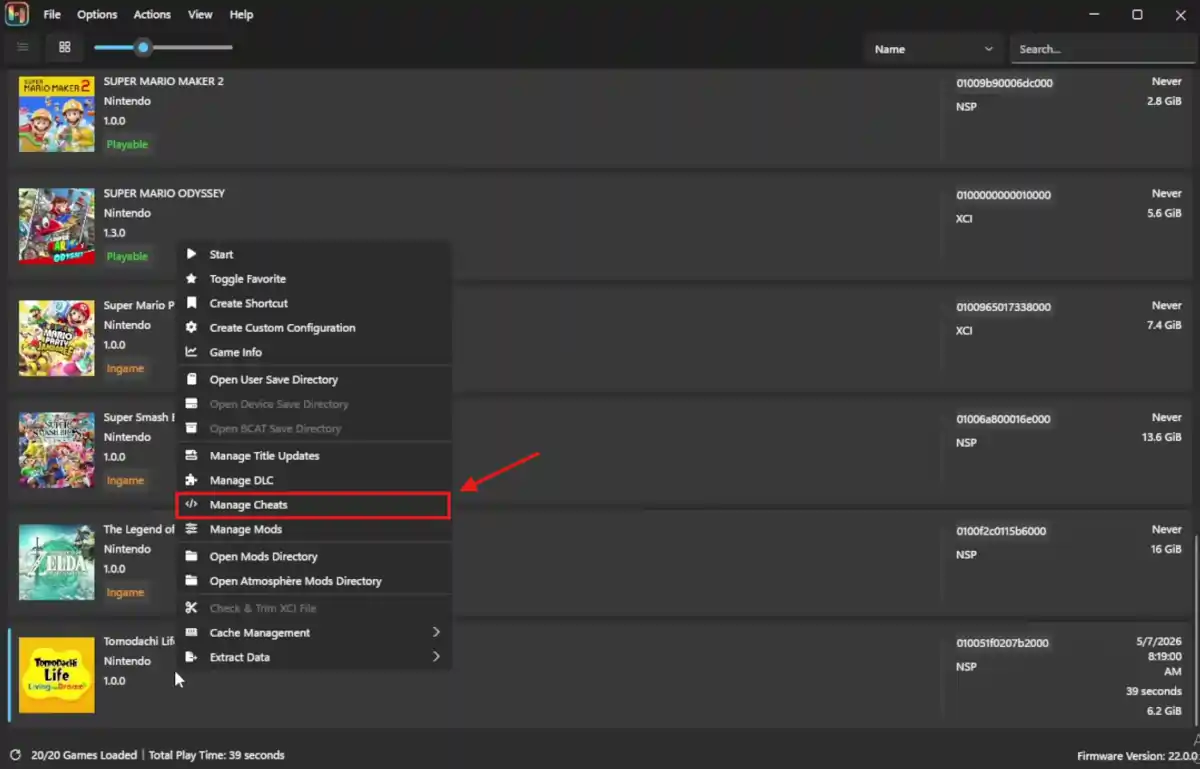
Ryujinx Canary is the test version of the Ryujinx Nintendo Switch emulator. It is updated often by the Ryubing project.
Many users like Ryujinx Canary because it has good performance and supports many games, including Tomodachi Life: Living the Dream.
If you want to play this game, follow the guide on How to Play Tomodachi Life: Living the Dream on PC Using Ryujinx before adding cheats.
The emulator also supports cheats. You can use cheats for:
- Infinite money or resources
- Unlocking content
- Gameplay improvements
- Quality-of-life features
Ryujinx Canary uses Atmosphere-style cheats, which are easy to install and manage.
This guide explains how to safely install and use cheats in 2026.
Is Ryujinx Canary Safe for Cheats?
Yes, it is usually safe if you download it from official sources.
Official Ryubing Canary releases:
https://git.ryujinx.app/Ryubing/Canary/releases
Some websites like ryujinxcanary.com also share official download links that point directly to the Ryubing releases.
These websites can make downloading easier because they help users choose the correct version for their device and operating system.
Still, always be careful and scan downloaded files with antivirus software.
For Windows, Linux, and Steam Deck, use x64 builds only.
Android versions are unofficial and should be checked carefully before use.
Things You Need Before Adding Cheats
Make sure Ryujinx Canary is fully set up.
- Download the latest Ryujinx Canary version from the Ryujinx Canary Download Page.
- Steam Deck users should use the x64 AppImage version
- Delete or rename the old
~/.config/Ryujinxfolder if needed - Install
prod.keysandtitle.keysin the system folder If you need help, follow this Ryujinx Prod Keys Guide. - Install firmware version 22.0.0 or newer
- Add your game folders in:
Options → Settings → Game Directories
Also Read: How to Add Games in Ryujinx
How Cheats Work in Ryujinx Canary
Ryujinx uses Atmosphere-style cheats stored in .txt files. These cheat files change game memory. Each cheat is linked to a specific Build ID.
Many users get cheats from trusted GitHub pages or the EdiZon Cheats Database. You can also check the Ryujinx Cheats Guide for more information and cheat-related tips.
Step-by-Step: Installing Cheats
Here’s a short and clear guide to install cheats in Ryujinx Canary:
Step 1: Download the Correct Cheats
Download cheats that match your exact game version.
Cheat downloads usually look like this:
Cheats/
└── cheats/
    └── 0123456789ABCDEF.txt
The file name is the Build ID.
Step 2: Open the Mod Directory
- Start Ryujinx Canary
- Right-click your game
- Select “Open Mod Directory”
This opens:
Ryujinx/mods/contents/[Game Title ID]/
Step 3: Copy the Cheat Files
Place the cheat folder inside the game mod folder.
Keep the same folder structure:
Ryujinx/mods/contents/[Game Title ID]/
└── [Cheat Folder]/
    └── cheats/
        └── [BuildID].txt
Step 4: Start the Game
Launch the game.
The cheats should load automatically.
If they do not work, restart Ryujinx Canary.
Managing Cheats
Ryujinx Canary does not have a built-in cheat menu, so managing cheats is done manually:
Disable Cheats
You can:
- Move cheat files into a
disabled_cheatsfolder - Rename the file like:
off_[BuildID].txt
Edit Cheats
Open the .txt file in a text editor.
Cheats often look like this:
[Infinite Money]
58000000 00CC9860
78000000 0002A1C0
61000000 00000000 00000063
You can disable lines by adding # at the beginning.
Avoid Cheat Conflicts
Do not use cheats that change the same feature.
For example:
- Multiple FPS unlock cheats
- Different speed hacks together
These can cause crashes or bugs.
Steam Deck Tips
- Use the x64 AppImage version
- Add the AppImage to Steam for Gaming Mode support
- Switch between Vulkan and OpenGL if cheats cause problems
- Use the
Tab + Steam Keyboardmethod for Apply and OK buttons
Also Read: Ryujinx Stable vs Canary: Performance Test & Real Results
Common Cheat Problems
Here are the most common issues users face with cheats in Ryujinx Canary and how to fix them:
Cheats do not work
Make sure the Build ID matches your game version.
Game crashes
Turn off cheats one at a time to find the problem.
Cheats only work in Desktop Mode
Add the game shortcut to Steam again.
Performance becomes slower
Clear the shader cache or change the graphics backend. You can also use the Graphics Enhancements Guide to improve performance and visual quality.
Cheats are outdated
Update Ryujinx Canary and download newer cheat files.
If errors continue, check the Ryujinx Troubleshooting Guide. It covers many common problems and fixes.
Safety and Legal Tips
Always download Ryujinx Canary from official Ryubing releases or trusted websites that link directly to them.
Scan all downloaded files with antivirus software.
Emulators and cheats are legal tools in many places. However, you should legally own the games and dump your own ROMs, keys, and firmware.
Downloading copyrighted files from unofficial sources may be illegal in some regions.
Final Words
Ryujinx Canary with cheats gives users many ways to improve gameplay and customize their experience.
By following safe setup steps and using trusted cheat sources, you can enjoy a more stable and safer emulator setup.
Browse the Ryujinx Games Guide to find more compatible games and useful recommendations.
Keep your emulator updated, use trusted downloads, and enjoy your games safely.